
Discover practical, easy-to-follow steps to protect your personal data online. Learn about common online threats and how to stay safe without being a tech expert.
How to Secure Your Personal Data Online: The Complete Guide for Everyday Users
Do you use the internet daily? Log into Facebook, shop online, pay bills, chat on WhatsApp, or send emails? Then this article is for you.
You don’t need to be “tech-savvy” to protect your personal data. In fact, most problems occur precisely because ordinary users don’t know what to watch out for.
Let’s see, step by step, what risks exist, where we make the most mistakes, and what you can do simply and quickly to stay safer online.
What is personal data (in simple terms)
Personal data is any information that identifies you or tells something about you.
Examples:
- your name
- email address
- phone number
- Facebook or email password
- card details
- personal photos
- location (where you are, where you live)
⚠️ Even a single email or phone number can be enough for scammers.
The most common online dangers (explained simply)
1. Fake messages and emails (phishing)

Have you ever received a message like:
- “Your account has been blocked. Click here!”
- “You’ve won a prize!”
- “The courier couldn’t deliver your package”
👉 Most of the time, these are fake messages, designed to scare you or rush you.
Common mistake: you click the link and enter your details.
✔️ What to do:
- don’t click on suspicious links
- don’t enter passwords or bank details
- check directly on the official website
If it seems too urgent or too good to be true… it probably is.
2. Easy-to-guess passwords
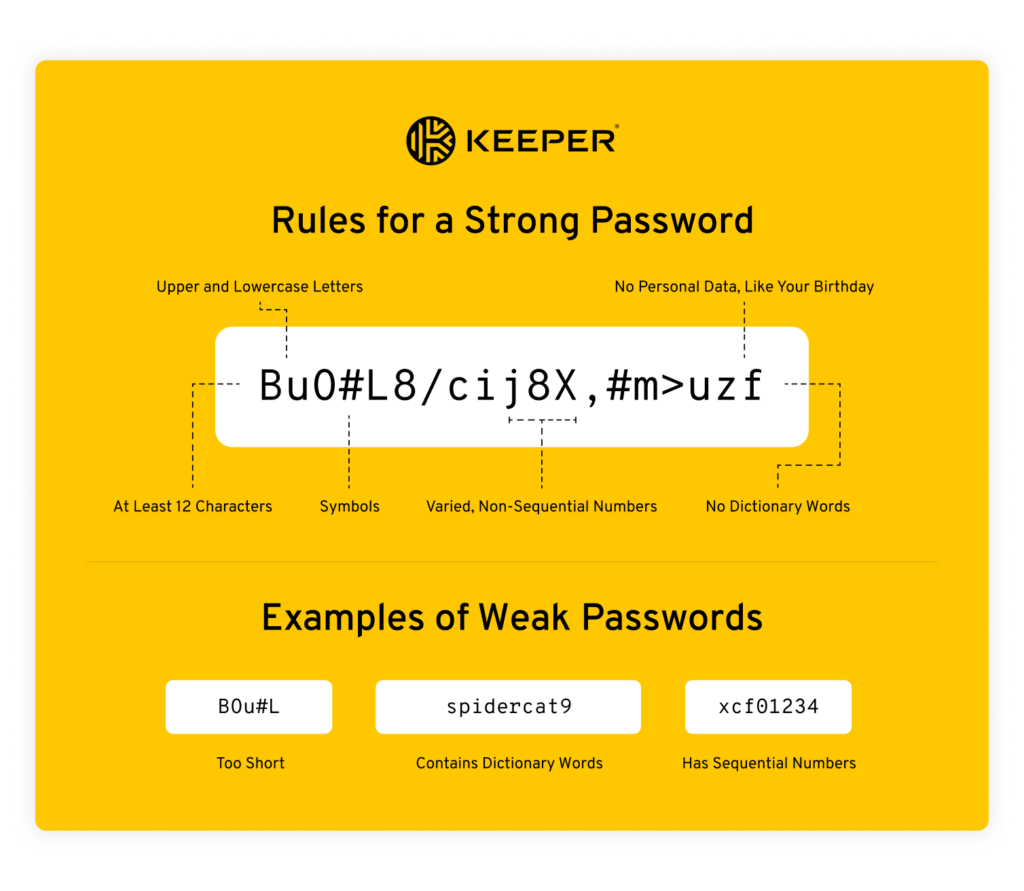
Simple passwords are like an unlocked door.
❌ Examples of bad passwords:
- 123456
- password
- your_name
- date of birth
❌ And even worse: the same password for all accounts.
✔️ How to create a stronger password:
- minimum 12 characters
- combine uppercase, lowercase, and numbers
- use a phrase that’s easy to remember
Good example: MorningCoffee2025!
3. Missing two-factor verification (SMS code)

Have you noticed that sometimes you receive a code on your phone when you log in? That’s two-factor verification.
👉 Even if someone discovers your password, they can’t access your account without that code.
✔️ Enable this feature for:
- Facebook / Instagram
- bank accounts
- online stores
It takes 2 minutes and could save your nerves (and your money).
4. Free Wi-Fi = be extra careful

Free Wi-Fi in cafes, malls, or airports is not secure.
❌ It’s not recommended to:
- make online payments
- log into your email or bank
If you really must, do it on mobile data, not public Wi-Fi.
5. Apps that ask for too many permissions
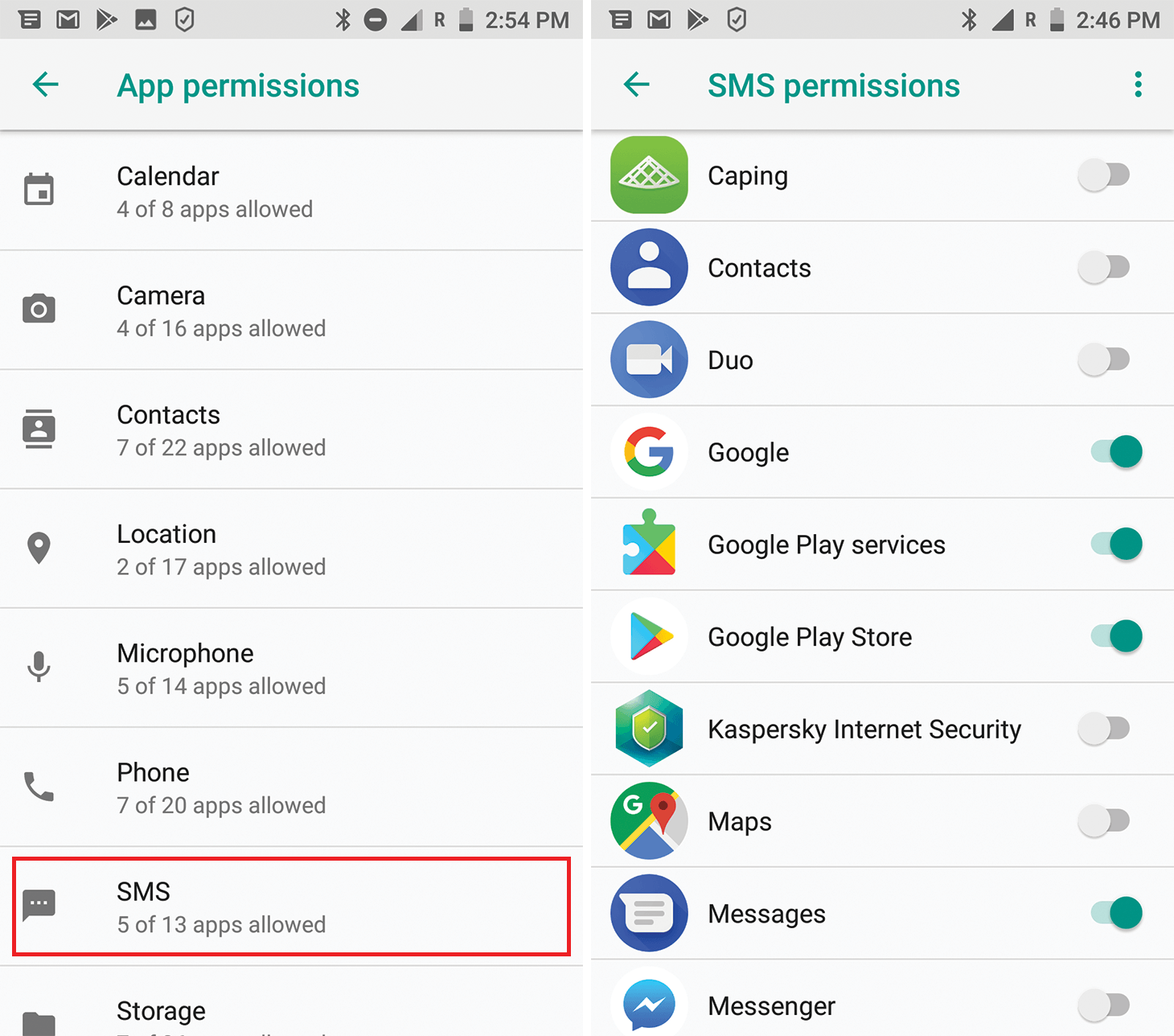
A flashlight app doesn’t need access to your contacts or microphone, right?
✔️ What to do:
- install apps only from Google Play / App Store
- check what permissions they ask for
- deny what doesn’t make sense
- delete unused apps
6. Too much information on social media
Many users say: “What can happen from just a photo?”
Well, quite a lot, actually.
❌ Risky examples:
- “We’re away on vacation for 2 weeks”
- photos of documents
- location enabled on every post
✔️ Simple tips:
- set your profile to private
- post vacation photos after you return
- don’t share personal data publicly
Simple rules to follow daily
✔️ Don’t share personal data via email or SMS
✔️ Always check the website address
✔️ Keep your phone and computer updated
✔️ Use antivirus (yes, on your phone too)
✔️ Backup your photos and documents
What to do if you think you’ve been scammed
- Change your password immediately
- Enable two-factor verification
- Check for any unusual activity
- Contact your bank if needed
The faster you react, the less damage you’ll suffer.
Conclusion
You don’t need to be an IT expert to protect your personal data. You just need to be a bit more careful.
The internet is useful, but it doesn’t forgive carelessness. A few simple habits can make the difference between “nothing happened to me” and “my account got hacked”.
Better to prevent than to fix it later 😉